How To Get Free MS Removal Tool - Hopefully with this article can help deal with disruption of the MS Removal virus. This scareware may report up to 30 infections on your computer which do not even exist. Besides, the scan is a little too fast to be real. It charges about $60 to remove the threats and even claims that your PC will be protected against other malware if you choose to purchase the full version of MS Removal Tool.
Of course, you shouldn't pay for this rogue AV. By the way, do not confuse this fake application with the Microsoft Windows Malicious Software Removal Tool which is a perfectly legitimate tool. Cyber-criminals clearly want to gain some credibility with well known names here.
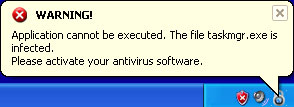
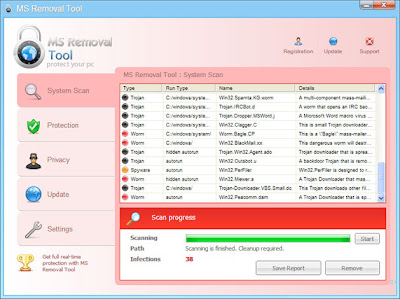 The bad news is that MS Removal Tool blocks malware removal tools and system utilities, Task Manager and other even changes your desktop wallpaper. If you click on any desktop icon you'll get a message that the program is infected and that you should run your anti-virus software.
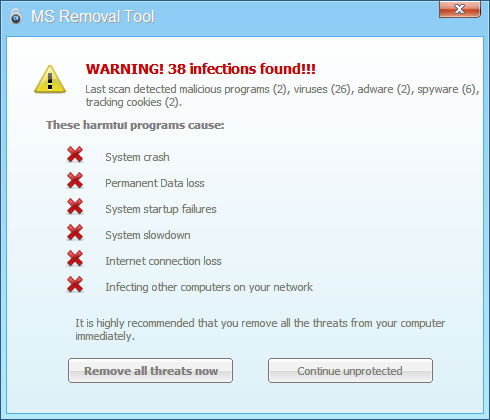
What is more, it constantly displays fake security warnings saying that your computer is infected with viruses, Trojan horses, spyware and other maliclious software.
It may modify Windows Hosts file too. If your computer is being infected by the MS Removal Tool, please follow the removal MS Removal instructions below. Please be advised, if you pay for this phony security software, you will subjected to monetary theft, or in a worst-case example, ID Theft. There is no guarantee that your credit card details aren't going to be sold to other third parties. Do not hesitate to contact us if you need further assistance or you have questions regarding removal of MS Removal Tool. Please leave a comment below. Good luck and be safe online!
How To Get Free MS Removal Tool
Of course, you shouldn't pay for this rogue AV. By the way, do not confuse this fake application with the Microsoft Windows Malicious Software Removal Tool which is a perfectly legitimate tool. Cyber-criminals clearly want to gain some credibility with well known names here.
 The bad news is that MS Removal Tool blocks malware removal tools and system utilities, Task Manager and other even changes your desktop wallpaper. If you click on any desktop icon you'll get a message that the program is infected and that you should run your anti-virus software.
What is more, it constantly displays fake security warnings saying that your computer is infected with viruses, Trojan horses, spyware and other maliclious software.
It may modify Windows Hosts file too. If your computer is being infected by the MS Removal Tool, please follow the removal MS Removal instructions below. Please be advised, if you pay for this phony security software, you will subjected to monetary theft, or in a worst-case example, ID Theft. There is no guarantee that your credit card details aren't going to be sold to other third parties. Do not hesitate to contact us if you need further assistance or you have questions regarding removal of MS Removal Tool. Please leave a comment below. Good luck and be safe online!
MS Removal Tool removal instructions (in Safe Mode with Networking):
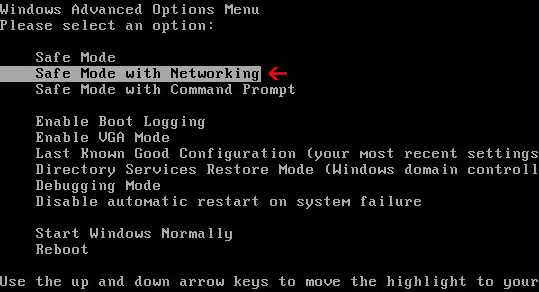
1. Reboot your computer is "Safe Mode with Networking". As the computer is booting tap the "F8 key" continuously which should bring up the "Windows Advanced Options Menu" as shown below. Use your arrow keys to move to "Safe Mode with Networking" and press Enter key. Login as the same user you were previously logged in with in the normal Windows mode. Read more detailed instructions here: http://www.computerhope.com/issues/chsafe.htm
2. Download free anti MS Removal Tool software from the list below and run a full system scan.
1. Reboot your computer is "Safe Mode with Networking". As the computer is booting tap the "F8 key" continuously which should bring up the "Windows Advanced Options Menu" as shown below. Use your arrow keys to move to "Safe Mode with Networking" and press Enter key. Login as the same user you were previously logged in with in the normal Windows mode. Read more detailed instructions here: http://www.computerhope.com/issues/chsafe.htm
2. Download free anti MS Removal Tool software from the list below and run a full system scan.
NOTE: in some cases the rogue program may block anti-malware software. Before saving the selected program onto your computer, you may have to rename the installer to iexplore.exe or winlogon.exe With all of these tools, if running Windows 7 or Vista they MUST be run as administrator. Launch the program and follow the prompts. Don't forget to update the installed program before scanning.
3. New threats appear every day. In order to protect your PC from such (new) infections we strongly recommend you to use ESET NOD32 Antivirus 4.
3. New threats appear every day. In order to protect your PC from such (new) infections we strongly recommend you to use ESET NOD32 Antivirus 4.
Alternate MS Removal Tool removal instructions using HijackThis or Process Explorer (in Normal mode):
1. Download iexplore.exe (NOTE: iexplore.exe file is renamed HijackThis tool from TrendMicro).
Launch the iexplore.exe and click "Do a system scan only" button.
If you can't open iexplore.exe file then download explorer.scr and run it.
2. Search MS Removal for such entry in the scan results:
Windows XP/2000:
O4 - HKCU\..\RunOnce: [fHrPqDaZcCg02547] C:\Documents and Settings\All Users\Application Data\fHrPqDaZcCg02547\fHrPqDaZcCg02547.exe
Windows Vista/7:
O4 - HKCU\..\RunOnce: [fHrPqDaZcCg02547] C:\ProgramData\fHrPqDaZcCg02547\fHrPqDaZcCg02547.exe
The process name will be different in your case [SET OF RANDOM CHARACTERS].exe, located in:
C:\Documents and Settings\All Users\Application Data\ in Windows XP and C:\ProgramData\ in Windows Vista/7. Select all similar entries and click once on the "Fix checked" button. Close HijackThis tool.
OR you may download Process Explorer and end MS Removal Tool process:
1. Download iexplore.exe (NOTE: iexplore.exe file is renamed HijackThis tool from TrendMicro).
Launch the iexplore.exe and click "Do a system scan only" button.
If you can't open iexplore.exe file then download explorer.scr and run it.
2. Search MS Removal for such entry in the scan results:
Windows XP/2000:
O4 - HKCU\..\RunOnce: [fHrPqDaZcCg02547] C:\Documents and Settings\All Users\Application Data\fHrPqDaZcCg02547\fHrPqDaZcCg02547.exe
Windows Vista/7:
O4 - HKCU\..\RunOnce: [fHrPqDaZcCg02547] C:\ProgramData\fHrPqDaZcCg02547\fHrPqDaZcCg02547.exe
The process name will be different in your case [SET OF RANDOM CHARACTERS].exe, located in:
C:\Documents and Settings\All Users\Application Data\ in Windows XP and C:\ProgramData\ in Windows Vista/7. Select all similar entries and click once on the "Fix checked" button. Close HijackThis tool.
OR you may download Process Explorer and end MS Removal Tool process:
- [SET OF RANDOM CHARACTERS].exe, i.e. fHrPqDaZcCg02547.exe
3. Download free anti-malware software from the list below and run a full system scan.
NOTE: in some cases the rogue program may block anti-malware software. Before saving the selected program onto your computer, you may have to rename the installer to iexplore.exe or winlogon.exe With all of these tools, if running Windows 7 or Vista they MUST be run as administrator. Launch the program and follow the prompts. Don't forget to update the installed program before scanning.
4. New threats appear every day. In order to protect your PC from such (new) infections we strongly recommend you to use ESET NOD32 Antivirus 4.
4. New threats appear every day. In order to protect your PC from such (new) infections we strongly recommend you to use ESET NOD32 Antivirus 4.
Associated MS Removal Tool files and registry values:
Files:
For Windows XP users:
Files:
For Windows XP users:
- C:\Documents and Settings\All Users\Application Data\[SET OF RANDOM CHARACTERS]\[SET OF RANDOM CHARACTERS].exe
- C:\Documents and Settings\All Users\Application Data\fHrPqDaZcCg02547\fHrPqDaZcCg02547.exe
For Windows Vista and Windows 7 users:
- C:\ProgramData\[SET OF RANDOM CHARACTERS]\[SET OF RANDOM CHARACTERS].exe
- C:\ProgramData\fHrPqDaZcCg02547\fHrPqDaZcCg02547.exe
Registry values:
- HKEY_CURRENT_USER\Software\Microsoft\Windows\CurrentVersion\RunOnce "[SET OF RANDOM CHARACTERS]"
Credit To: Malware Removal Tool.


